Ente Auth comparison

Compare
authenticator apps.

Your 2FA codes, wherever you need them.

Compare sync, backups and device support. Find out what makes Ente Auth a good home for your codes.

Phone. Desktop. Browser.

One place for your codes.

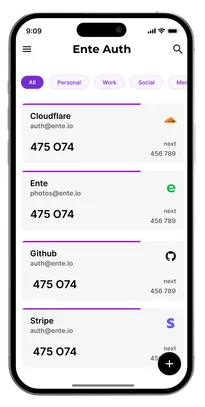
Ente Auth app showing account codes, tags and next-code previews
Free · Open source · Encrypted sync

Side by side

See how they compare.

AvailableUnavailableWith conditionsNot documentedNot applicable
Ente Auth compared with eight authenticator apps
FeaturesEnte Auth2FAS AuthAegisAuthyBitwarden AuthenticatorDuo MobileGoogle AuthenticatorMicrosoft AuthenticatorProton Authenticator
ACCESS
Desktop appsAvailableThe browser extension requests codes from your phone. It is not a standalone desktop app.UnavailableUnavailableDesktop codes are through Password Manager, with its TOTP generation tied to a paid plan. The standalone Authenticator is mobile-only.UnavailableUnavailableUnavailableAvailable
Web accessAvailableUse its browser extension with a paired phone. There is no standalone web vault.UnavailableUnavailableVault codes can be used in Password Manager on the web with a paid plan. Local Authenticator codes stay on your phone.UnavailableUnavailableUnavailableUnavailable
No account neededAvailableAvailableAvailableA phone number is required to set up Authy.AvailableAvailableAvailableAvailableAvailable
BACKUPS & EXPORTS
End-to-end encrypted syncAvailableCloud sync works within iOS or Android. Use export and import to move between them.Aegis is a local Android vault with no built-in sync service.AvailableSync uses Password Manager, which must stay logged in. Local Authenticator codes remain separate.Device cloud backup restores accounts on the same phone platform. It is not ongoing sync.Google documents encryption in transit and at rest. End-to-end encryption is not documented.Cloud backup restores accounts on the same phone platform. It is not ongoing sync.Available
Automatic exportCreates a portable backup file automatically. Cloud sync and phone backups offer recovery too, but do not automatically export a file you can keep.AvailableAutomatic encrypted cloud backup is available. Exporting a portable .2fas file is manual.Automatic backups can be saved to a folder you choose.Encrypted cloud backups and mobile sync are available. Authy does not export a portable file.Local codes are covered by device cloud backups. There is no scheduled portable file export.Duo Restore uses device or cloud backup. It does not create a portable code export.Google Account sync is optional. Exporting accounts to a QR code is manual.Cloud backup supports same-platform restore. It does not create a portable export file.Available
Export codesAvailableAvailableAvailableUnavailableStandalone Authenticator exports local codes. Synced codes need a separate Password Manager export.UnavailableExport your accounts using QR transfer.UnavailableAvailable
Import from other appsAvailableAvailableAvailableUnavailableAvailableUnavailableUnavailableUnavailableAvailable
EVERYDAY USE
Tags / groupsAvailableAvailableAvailableUnavailableUnavailableUnavailableUnavailableUnavailableSearch and manual ordering are available, but no account groups or tags were found in the current app.
FavoritesAvailableFavorites are available in the Apple Watch app; the phone apps offer groups and manual ordering.AvailableUnavailableAvailableUnavailableUnavailableUnavailableManual ordering is available; no favorite or pin action was found in the current app.
Next code previewSee the upcoming time-based code before the current one expires. A countdown or a new code after expiry is different.AvailableAvailableAvailableThe current code updates after its timer. An early preview of the following TOTP code was not found.AvailableDuo displays a current passcode on request. An early preview of the following TOTP code was not found.The next time-based code appears after rotation. The separate “Get next code” control advances counter-based HOTP codes.The timer counts down to the next code; it does not display that code early.Available
Trash & restoreAvailableAvailableUnavailableDeleted-token recovery has a 48-hour window and depends on the token and prior backup settings.UnavailableUnavailableUnavailableUnavailableUnavailable
Temporary code sharingShare working codes through an encrypted link that lasts 2, 5 or 10 minutes. Your secret key stays private. Supports TOTP and Steam codes.AvailableUnavailableUnavailableUnavailableUnavailableUnavailableUnavailableUnavailableUnavailable
OPEN
CodeAvailableAvailableUnavailableApp and server repositories are public. Some server components have separate source-available licenses.UnavailableUnavailableUnavailableThe apps are open source; the hosted backend is proprietary.
DesignNo public editable Authenticator design file found.No public editable Authenticator design file found.No public editable Authenticator design file found.The public repository links a web component design library. No standalone Authenticator design file was found.No public editable Authenticator design file found.No public editable Authenticator design file found.No public editable Authenticator design file found.No public editable Authenticator design file found.
MetricsNo comparable public business metrics dashboard found.No comparable public business metrics dashboard found.No comparable public business metrics dashboard found.No comparable public business metrics dashboard found.No comparable public business metrics dashboard found.No comparable public business metrics dashboard found.No comparable public business metrics dashboard found.No comparable public business metrics dashboard found.
Independent auditPublished third-party security reviews of the app or security components it uses. A check does not mean every current Authenticator feature was separately audited; see each note for scope.No published third-party audit report covering this authenticator was verified in the official sources checked.No published third-party audit report covering this authenticator was verified in the official sources checked.No published third-party audit report covering this authenticator was verified in the official sources checked.Published Unit 42 and Mandiant assessments include the mobile Authenticator apps.No published third-party audit report covering this authenticator was verified in the official sources checked.No published third-party audit report covering this authenticator was verified in the official sources checked.No published third-party audit report covering this authenticator was verified in the official sources checked.Proton publishes independent audits of related products, and Authenticator uses shared account encryption. An Authenticator-specific report has not yet been published.

Independent reviews

Security you can examine.

Cure53 reviewed Ente’s encryption design and later the shared server infrastructure used by Auth. Explore both published reports.

The 2023 client review focused on Photos. These reports do not separately cover every current Auth feature.

Proton publishes audits of related products and uses shared account encryption. An Authenticator-specific report has not yet been published.

Switch to Ente

Bring your codes with you.

Import from Google Authenticator, 2FAS, Aegis, Proton and more. Our guide walks you through the move.

See how to switch
See supported apps

Google Authenticator, 2FAS, Aegis, Proton Authenticator, Bitwarden, andOTP, Raivo OTP, LastPass Authenticator and OTP Auth.

Authy and Microsoft do not offer a straightforward bulk export. You may need to set up 2FA again on each service.

  1. Save recovery codes

    Keep each account’s recovery codes somewhere safe.

  2. Import your accounts

    Import from other apps or scan a QR transfer.

  3. Check your codes

    Test a sign-in, make a backup and delete temporary export files.

Made for everyday use

Small details. Easier sign-ins.

Find the right account, copy a code and get on with your day.

Before you switch

Questions before you switch?

Do I need an Ente account?

No. Choose “Use without backups” to keep your codes on your device. Create an account when you want encrypted cloud backup and sync. For local use, keep an encrypted export or turn on local backups.

Where can I use Ente Auth?

Use Ente on Android, iPhone, Mac, Windows and Linux. You can also view, search and copy synced codes in your browser.

Can I use Ente for work accounts?

Ente works with services that support standard authenticator codes. Microsoft and Duo work approvals, device checks and passwordless sign-in still need the apps your organization requires.

How do I keep a backup of my codes?

Use encrypted cloud backup, save an encrypted export, or enable automatic local backups. Keep your backup password and service recovery codes somewhere safe. Backup and export guide.

Get Ente Auth

Your codes.
Within reach.

Get Ente Auth

Free. Open source. Start without an account.